Threat Modeling Studio: Canvas Badges & Visual Legend
Decode every red STRIDE/ATLAS badge, dashed Trust Boundary, transport & sensitivity pill, identity label, and Crown Jewel marker on the canvas.
“Every red badge on the canvas is a conversation you don't have to have at 3:00 AM during an incident.”
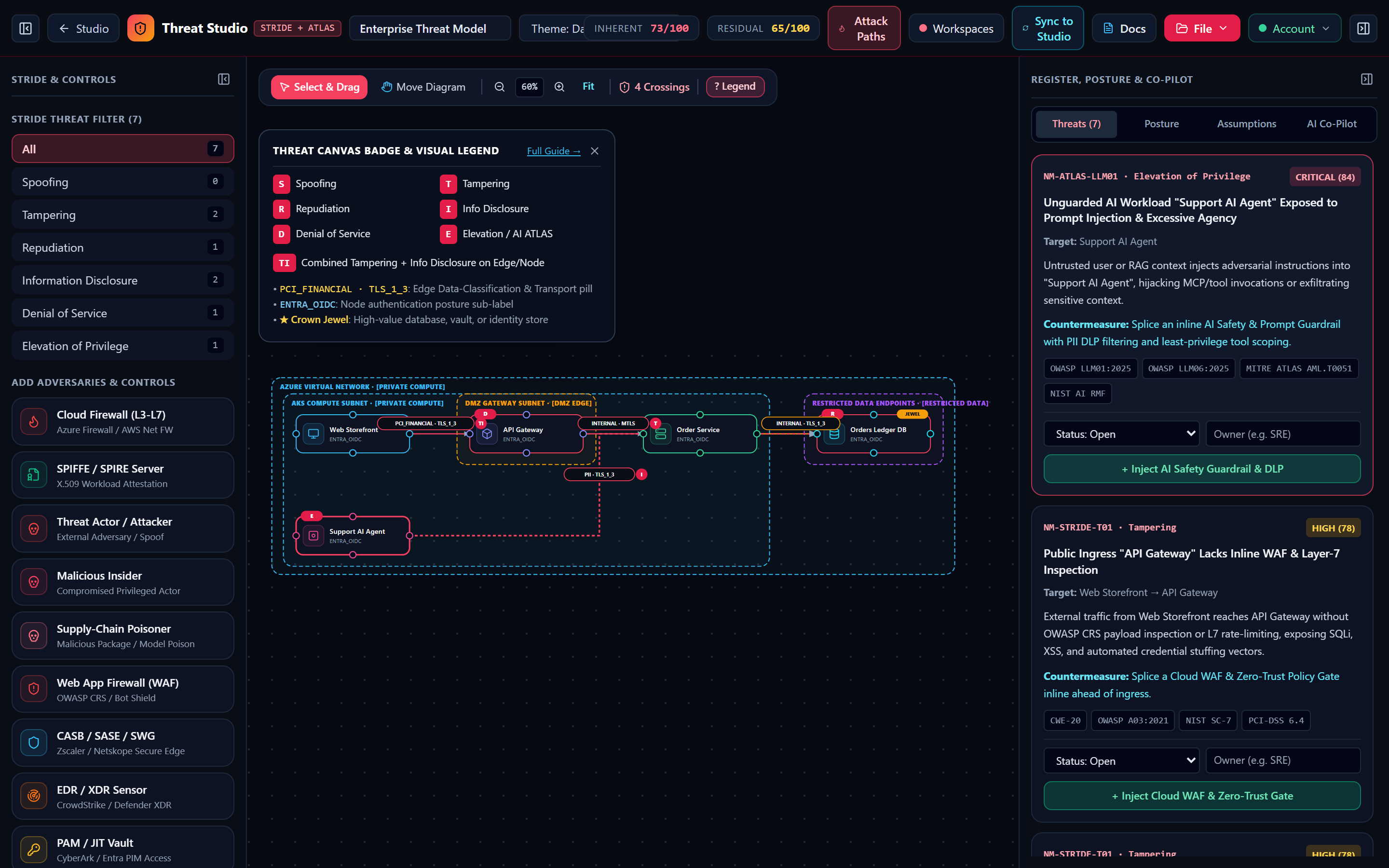
Single letters mark individual threats (e.g. D = Denial of Service, R = Repudiation). Combined pills like TI flag both Tampering and Information Disclosure on the same hop.
Whenever a connector crosses a dashed zone boundary without mTLS or WAF inspection, the edge pill glows crimson/amber to highlight unauthenticated boundary crossings.
Shows the inferred data sensitivity (PUBLIC, INTERNAL, PII, PCI_FINANCIAL, CREDENTIALS) paired with transport security (PLAINTEXT, TLS_1_3, MTLS).
Amber JEWEL badges highlight Crown Jewel databases/vaults; sub-labels like ENTRA_OIDC or NONE reflect the component authentication posture.
1. Anatomy of the Threat Modeling Studio Canvas
In Threat Modeling Studio, every visual element on the canvas communicates live security posture and deterministic threat state. Clicking the ? Legend button in the floating canvas toolbar opens the interactive reference overlay at any time:
2. Complete Visual Legend: Red STRIDE & Combined Threat Pill Badges
Whenever the STRIDE + MITRE ATLAS Engine detects an open vulnerability on a node or connector, it renders a high-visibility crimson pill badge in the top-right corner of the node card or at the midpoint of the data-flow connector:
| Badge | STRIDE Category | Rule ID & Inherent Score | Exact Trigger Condition in threatEngine.ts | 1-Click Auto-Fix / Remediation |
|---|---|---|---|---|
| S | Spoofing | NM-STRIDE-S01 (90 / 76) | Connector crosses a Trust Boundary (srcTier !== dstTier or cross-subnet) with authMechanism === 'none' or originates from a threat_actor node. | Click Enforce mTLS + Identity Auth (encrypt_mtls). |
| T | Tampering | NM-STRIDE-T01 (78) | Publicly exposed or untrusted source connects to an internal service/gateway when no active inline waf, ddos, or zero_trust control exists. | Click + Inject Cloud WAF & Zero-Trust Gate (inject_waf). |
| R | Repudiation | NM-STRIDE-R01 (68) | Node is marked crownJewel === true while auditLogging === false and no active siem collector node is present on the canvas. | Click + Attach SIEM & Audit Collector (inject_siem). |
| I | Information Disclosure | NM-STRIDE-I01 (88 / 74 / 62) | Connector uses plaintext transport (score 88), OR carries sensitive data (pii, pci_financial, credentials) without mtls (score 74 to Crown Jewel, 62 standard). | Click Upgrade Flow to mTLS + X.509 (encrypt_mtls). |
| D | Denial of Service | NM-STRIDE-D01 (64) | Internet-exposed compute or gateway node (publicExposure === true) operates without an upstream WAF or DDoS rate-limiting control. | Click + Inject Cloud WAF & Zero-Trust Gate (inject_waf). |
| E | Elevation of Privilege | NM-ATLAS-LLM01 (84) / NM-STRIDE-E02 (86) | Triggered when an AI workload (agent, llm, rag_pipeline) lacks an active ai_guardrails/dlp node, OR when a security control is toggled to Simulated Failure (controlDisabled === true). | Click + Inject AI Safety Guardrail & DLP or restore the disabled control. |
| TI | Combined Multi-Threat Badge | NM-STRIDE-T01 + NM-STRIDE-I01 | Rendered on connectors (such as #1 POST /checkout) that simultaneously exhibit Tampering (no WAF on public ingress) and Information Disclosure (PCI_FINANCIAL over standard TLS without mTLS pinning). | Apply both 1-click auto-fixes to eliminate the badge completely. |
3. Edge Classification Pills, Node Auth Sub-Labels & Trust Boundary Tiers
Edge Classification & Transport Pills
Every connector displays a pill beneath its protocol label formatted as <CLASSIFICATION> · <TRANSPORT>:
PCI_FINANCIAL · TLS_1_3(inferred from checkout/payment/card/pci labels)PII · TLS_1_3(inferred from user/profile/customer/rag labels)CREDENTIALS · MTLS(inferred from auth/token/jwt/secret labels)INTERNAL · MTLS(inferred from gRPC/mTLS service calls)
Node Auth Sub-Labels & Crown Jewels
Each node card renders its active authentication posture (ENTRA_OIDC, MTLS_CERT, API_KEY, or NONE). Data stores (postgres, redis, cosmos, vector) and vault nodes are automatically marked as ★ Crown Jewels, increasing the severity of unencrypted incoming flows and requiring immutable SIEM audit logging.
4 Dashed Trust Boundary Tiers
Zone containers render with color-coded dashed borders according to their TrustTier rank:
- Crimson (#ef4444):
untrusted_public(Rank 0) - Amber (#f59e0b):
dmz_edge(Rank 1) - Sky Blue (#38bdf8):
private_compute(Rank 2) - Purple (#a855f7):
restricted_data(Rank 3)
There Are No Dumb Questions
Candid answers to the skeptical questions every security engineer asks first.
Sharpen Your Pencil · 60-Second Brain Challenge
A RAG pipeline retrieves unredacted customer PII from a Vector Store over plaintext HTTP without a guardrail. Which badge fires?
- ▸Red pills (S, T, R, I, D, E, TI) show active STRIDE categories at a glance.
- ▸Dashed borders highlight Trust Boundaries; amber/red crossings need mTLS or WAFs.
- ▸Amber JEWEL tags prioritize Crown Jewel data stores during Blast-Radius analysis.