Architecture Studio & Aesthetic Canvas
Deterministic orthogonal routing, nested trust zones, step-by-step packet playback, Well-Architected Advisor, Aesthetic Backdrop Switcher, and Word/PDF runbooks.
“Good architecture diagrams don't just look clean—they make illegal network paths visually obvious.”
1. Deterministic Orthogonal Routing & Nested Trust Zone Engine
Unlike freeform drawing tools where connectors cross through boxes and require manual pixel-nudging, NodeMotion's Deterministic Layout Engine computes a collision-free topology layout automatically:
- Automatic Tier Classification: Components are classified into horizontal architectural columns based on their catalog type and graph in-degree/out-degree:
- Tier 0 (External Ingress):
browser,mobile,laptop_client,branch_office,threat_actor. - Tier 1 (DMZ & Edge Gateways):
apigw,waf,cdn,lb,nlb,ingress,iam. - Tier 2 (Private Compute, K8s & AI Agents):
service,k8s,serverless,agent,llm,rag_pipeline,redis. - Tier 3 (Restricted Data & HSM Vaults):
postgres,cosmos,vector,kafka,s3,vault,siem.
- Tier 0 (External Ingress):
- Two-Level Nested Zone Containers (
ZoneBox): Nodes support bothparentGroup(outer cloud boundary, e.g., Azure Virtual Network) andgroup(inner subnet, e.g., Gateway Subnet, AKS Compute Subnet, Private Data Endpoints). Dragging an outer VNet header drags all child subnets and nodes simultaneously. - Orthogonal Midpoint Channel Offset: When multiple connectors share the same vertical or horizontal corridor, the router offsets their orthogonal bends and protocol label pills so step numbers (
#1..#6) never overlap.
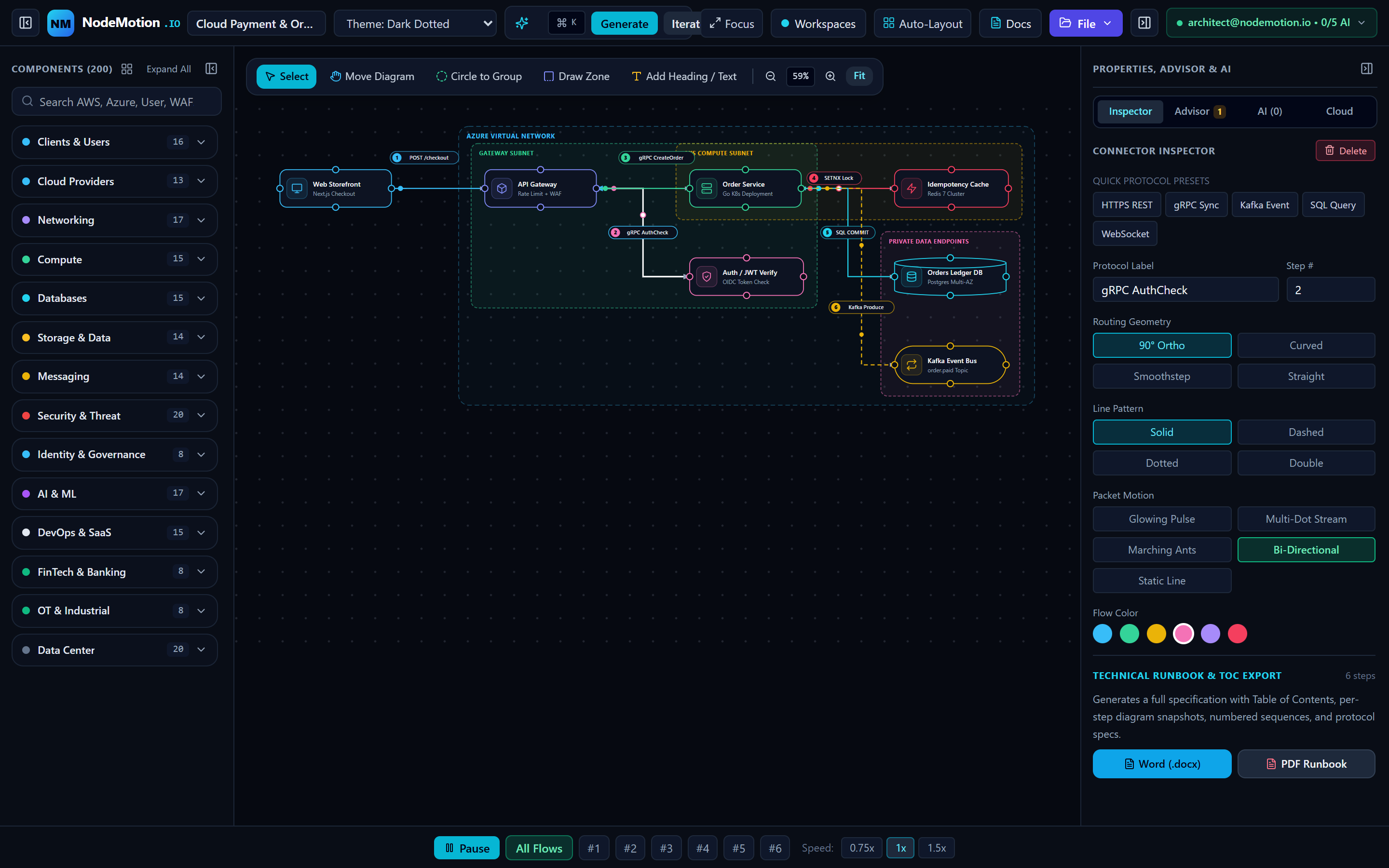
2. Canvas Tool Modes, Port Wiring & Packet Motion Styles
| Feature / Control | Options / Modes | Engineering Behavior & Usage |
|---|---|---|
| Canvas Tool Modes | select · pan_all · lasso_group · zone_box · text | Switch between single-element selection, full-diagram panning, rubber-band multi-node lasso selection, custom Trust Boundary rectangle drawing, and free-floating SLA text callouts. |
| 4-Port Node Anchors | top · right · bottom · left | Hover over any node to reveal 4 directional ports. Drag from any port to another node's port to wire a directed edge, or reassign ports in the right-hand Inspector. |
| Connector Geometries | ortho · curved · straight | Orthogonal uses right-angle engineering channels; Curved uses smooth cubic Beziers; Straight connects direct vertical/horizontal peers. |
| SMIL Packet Motion | pulse · multidot · ants · bidirectional · none | Pulse renders a glowing single packet; Multi-Dot streams continuous event bursts (ideal for Kafka/EventHub); Marching Ants animates stroke dashes; Bi-Directional animates synchronous request/response RPCs. |
| Node Shapes & Resizing | rect · cylinder · pill · diamond · hexagon | Databases render as 3D cylinders, message buses as pills, gateways as hexagons/diamonds. Selected nodes expose 8 directional resize handles (nw, n, ne, e, se, s, sw, w). |
3. Well-Architected Advisor & 1-Click Auto-Fixes
Clicking the Advisor tab in the right-hand panel of Architecture Studio runs the deterministic Well-Architected Advisor alongside optional AI synthesis:
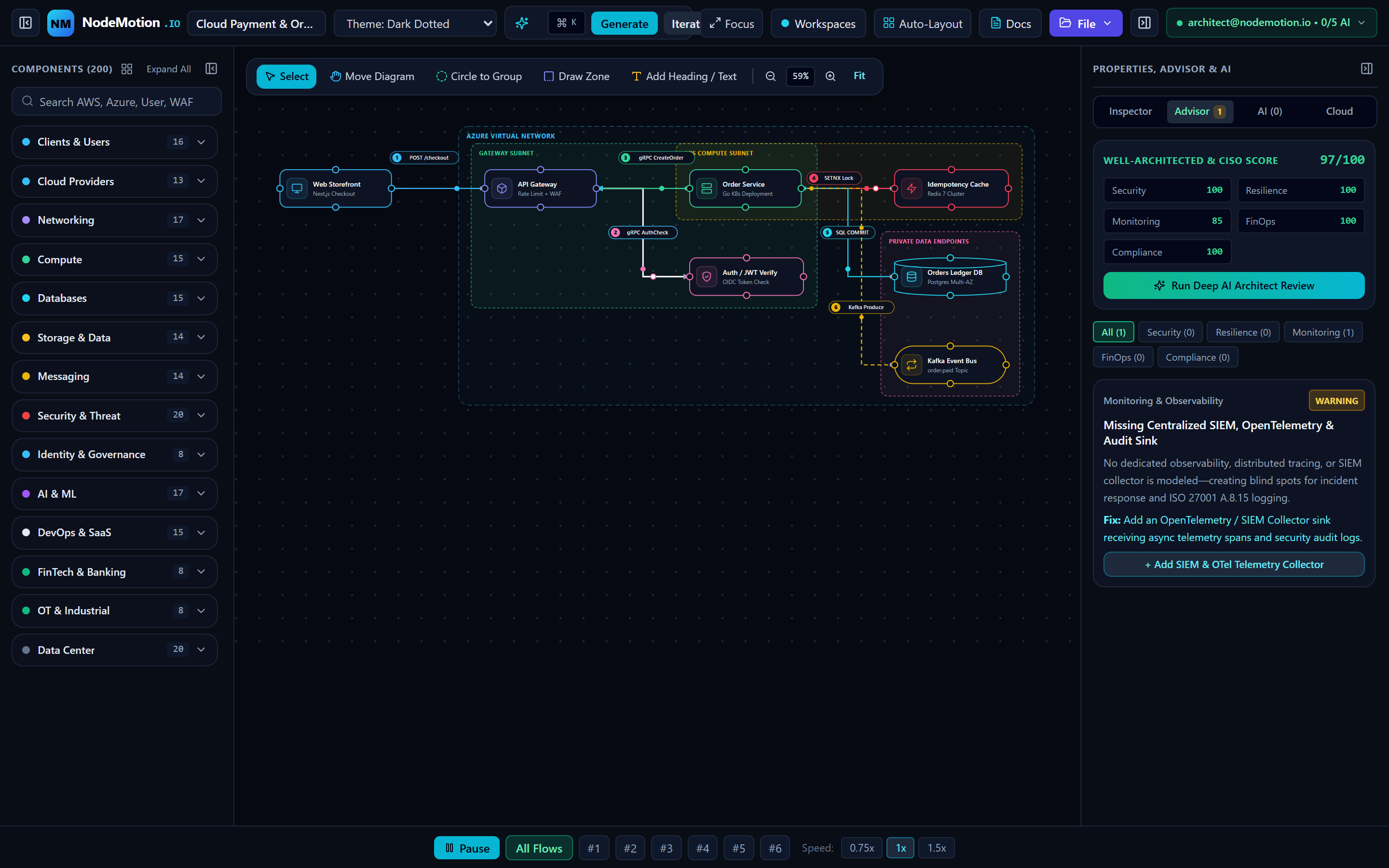
1. Security Pillar
Detects public internet ingress lacking an inline Cloud WAF / DDoS gate, unauthenticated East-West service hops, and missing Key Vault secret management.
2. Reliability Pillar
Flags single points of failure (SPOFs) in compute or database tiers, missing multi-AZ standby replicas, and synchronous chains that lack dead-letter queues or circuit breakers.
3. Performance Efficiency Pillar
Identifies high-read database bottlenecks without an upstream Redis/Memcached read-through cache or static assets served without an edge CDN.
4. Cost Optimization Pillar
Highlights over-provisioned dedicated clusters where serverless consumption or tiered object storage lifecycle policies reduce cloud spend.
4. Full-Page Aesthetic Theme Switcher & Technical Runbook Exports
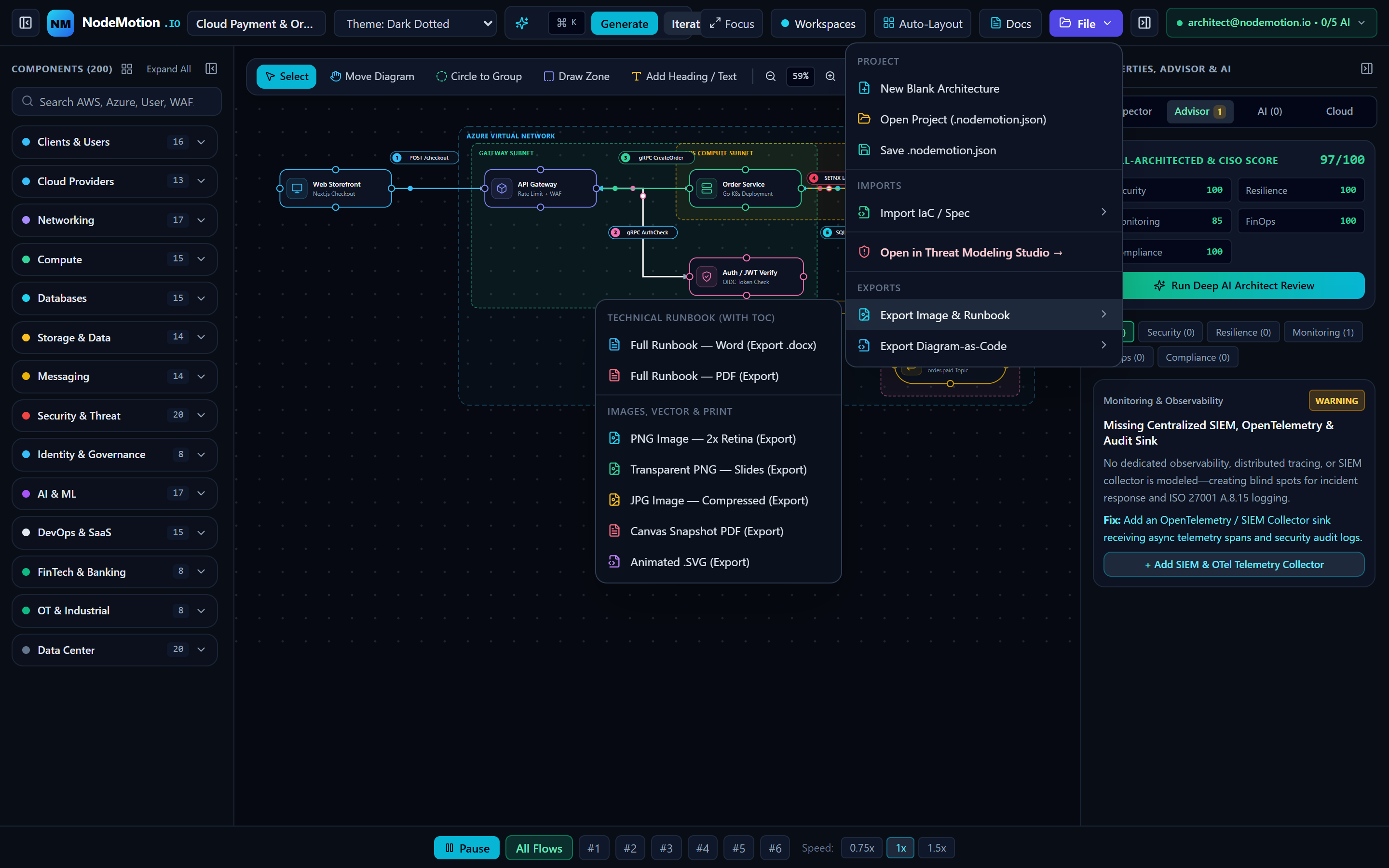
Selecting a theme in the top bar of Architecture Studio, Threat Studio, or this Documentation Portal applies data-app-theme across the entire page—transforming headers, sidebars, cards, tables, typography, and the SVG canvas simultaneously:
- Dark Dotted (
dark-dots): Deep obsidian (#070a12) for high-contrast live demos. - Light Dotted (
light-dots): Full daylight white-paper mode (#f1f5f9/#ffffffsurfaces with dark slate ink) ideal for printing and Word/Confluence embedding. - Engineering Grid (
grid): Technical indigo/cyan 24px grid lines for hardware and subnet alignment. - CAD Blueprint (
blueprint): Deep naval engineering blueprint (#041229) with cyan drafting borders. - Blackboard (
blackboard): Warm architectural chalkboard (#0e1411) with emerald chalk accents.
There Are No Dumb Questions
Candid answers to the skeptical questions every security engineer asks first.
- ▸Every diagram node, edge, and trust boundary stays synchronized across studios.
- ▸1-click countermeasures update both the visual topology and Residual Risk score.
- ▸Export SARIF v2.1.0, Threat Dragon v2 JSON, Jira CSV, and CISO PDFs anytime.